Moving YipitData from email to an investor platform
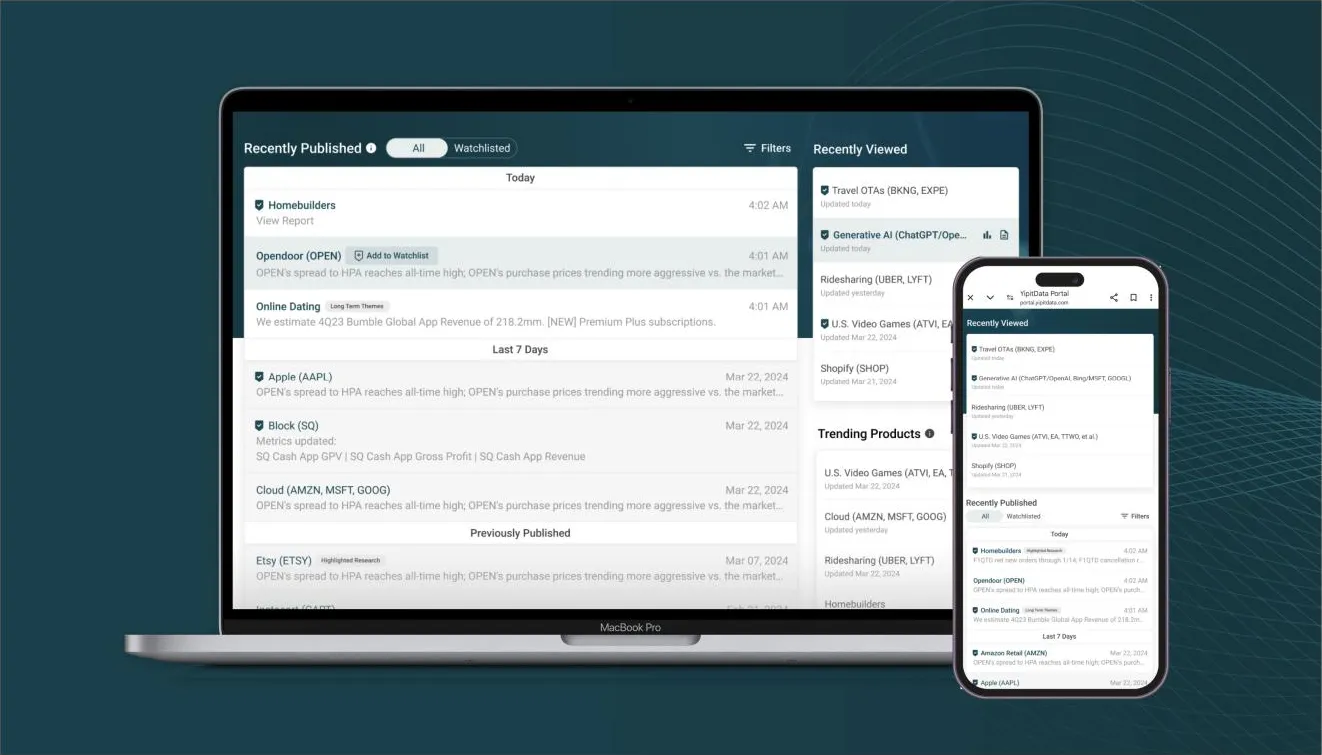
Context
YipitData is a fast-growing leader in alternative data, turning non-traditional data sources into actionable insights for institutional investors and businesses. In 2021, the company secured a $475 million investment from Carlyle Group.
At the time, the service was delivered mainly by email, which posed security risks and showed early signs of potential data-sharing concerns. I was hired to address this by encouraging customers to adopt the Investor Platform, where they could securely access reports and dashboards through a streamlined web experience.
My role
I led the end-to-end design process to move YipitData’s service from email-based delivery to a web platform, building the experience from 0 to 1.
- 97%User adoption
- 2xUser engagement
- 72%Retention
Understanding customers
Design and Product had little precedent for working with customers directly. Recognizing the value of real feedback, I spent three months reviewing recorded calls, identifying pain points and mapping insights with my PM. We worked with revenue teams to reach customers and hear from them directly, creating research artifacts like affinity maps and user flow diagrams so the designs stayed aligned with customer needs.
Workflow
- …my workflow with the portal is initially, I just relied on the emails…
- I do like this trending products on the top of the page just to get a sense of is there something that I should be focusing on…
Discoverability
- Notifications like knowing when the reports are coming out, maybe like calendaring, definitely.
- …if I’m in a very deep in an email kind of potentially go through a note, if I’m not, it’s more like a skimming.
- …I will go back, you know, one or two reports back just to get a sense of what was written.
Deep-dive
- I can Zoom in on this chart which is helpful.
- …just visually for me to see two year growth rates across time… it just helps you absorb it better than graphs.
- …every time you send an update, I’m just literally copy pasting and the raw data.
- …it’s very ad hoc and manual.
Personalization
- In order to make it useful, you should make it, you know, more customized.
- I would encourage you to have something where you can say this is my focus list.
- I have probably 10 names that I care the most and then I have like 50 other names that I think I don’t know them enough.
The affinity maps showed what customers cared about: finding content, going deeper into the data, and focusing on the names that mattered to them. To see how that played out in practice, I mapped user flows from the moment they received an email, through signing in, to digging into the data.
Mapping each path made it easier to see where the platform could meet those needs. I also used the flows to ask how each feature would help different kinds of users.
- 1
CS sends email about signing up to the portal
- 2
User creates an account
- 3
Portal landing page
- 4
Scrolls to My Product Grid
- 5
Marks products as favorite + enables email for all products
- How does marking products as favorite benefit these users?
- How does enabling email preferences benefit these users?
- 6
Goes to YD live page
- 7
Views all metrics
- 8
Adds metrics to watchlist
- How does adding metrics to watchlist benefit these users?
Impact of favorite
Show Product in the search bar.
What if we showed favorite products in BTB?This wouldn’t impact this client as much since they have only 5 or less products, so we can safely assume they’re all favorites.
Impact of email notification
User receives an email as soon as a report is published.
What if only products with email turned on showed in BTB?Since there are only 5 or less products, this feature wouldn’t be impactful. It’s just an additional step.
Impact of watchlist
Watchlisted metrics in a new grid on top of the page. Not super impactful for a user with 5 or less products.
What % users fall under this category
30.03%
Receives 5 reports via email
Receives BTB email
Login to portal
Go to YDL page
Do I expect these values?
Move to next product
Open dashboard to take a deep dive into data
Download data for further analysis
Login to portal
Product Details Page
Reports
Read report
Schedule call with RA
Is BTB useful for this user?
Probably not since their coverage is small.
One of the user flow diagrams, from onboarding to digging into the data.
Problems to solve
Four problems came out of that research.
- 1
Discoverability of existing content
How might we make it easy for customers to quickly find the content they are looking for?
- 2
Ability to deep-dive
How might we empower our users to do their own deep-dive analysis from our platform and data offerings?
- 3
Personalization and customization
How might we make it easy for customers to focus on what matters to them most?
- 4
Streamlining updates and preserving context
How might we quickly update customers on new changes and enable seamless transitions from key findings to deep dives, preserving their context?
Creating the design system
I built a design system for the investor platform, creating components and managing tokens. A design system streamlines handoff by removing the need to annotate every component for engineers, which made it an invaluable part of the workflow.
One challenge during implementation was how the components behaved. Engineers used MUI, and its defaults didn’t fully match the design: the colors were too bright, and interactions relied on clicks where the design leaned on hover. To resolve this, certain components and their behavior were redefined, which cut down on repetitive annotation during handoff.
Color
- main#0D4753
- dark#0C404B
- light#255964
- hover10%
- selected15%
- focus20%
- outline30%
- primary87%
- secondary60%
- tertiary#9E9E9E
- disabled38%
Type
- Heading 124px · 700
- Heading 316px · 500
- Body14px · 400
- Caption12px · 400
Filter custom, since MUI has none
Try it: hover Consumer Goods, then pick a category.
FilterEvolving the platform experience
By building on what I learned about customers and working closely with PMs and engineers, I improved how customers used the platform: a seamless web experience that gave them a professional, modern way to work with YipitData.
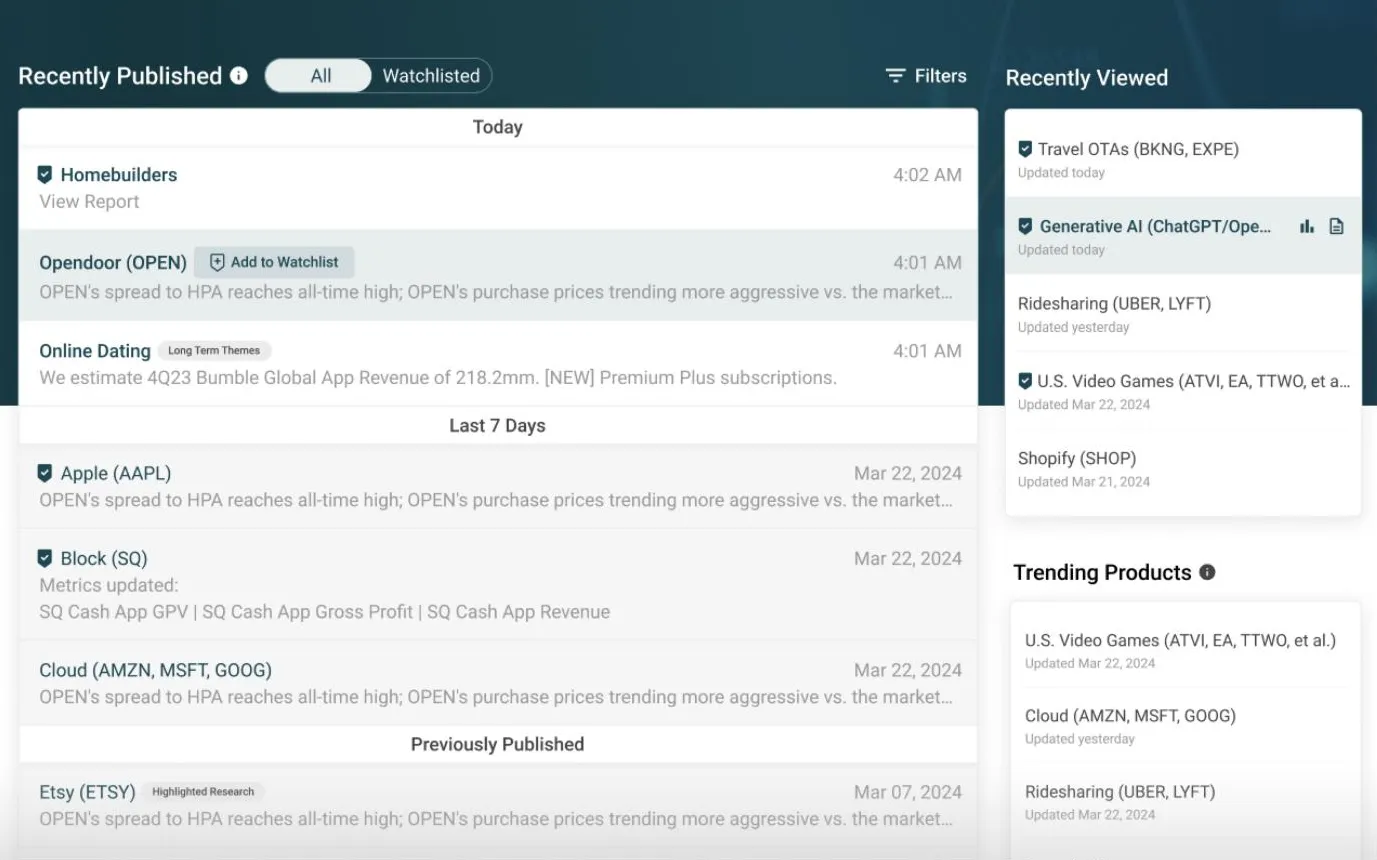
Homepage
The homepage design made it easy for customers to quickly find the content they needed, resulting in a 12x increase in daily visitors.
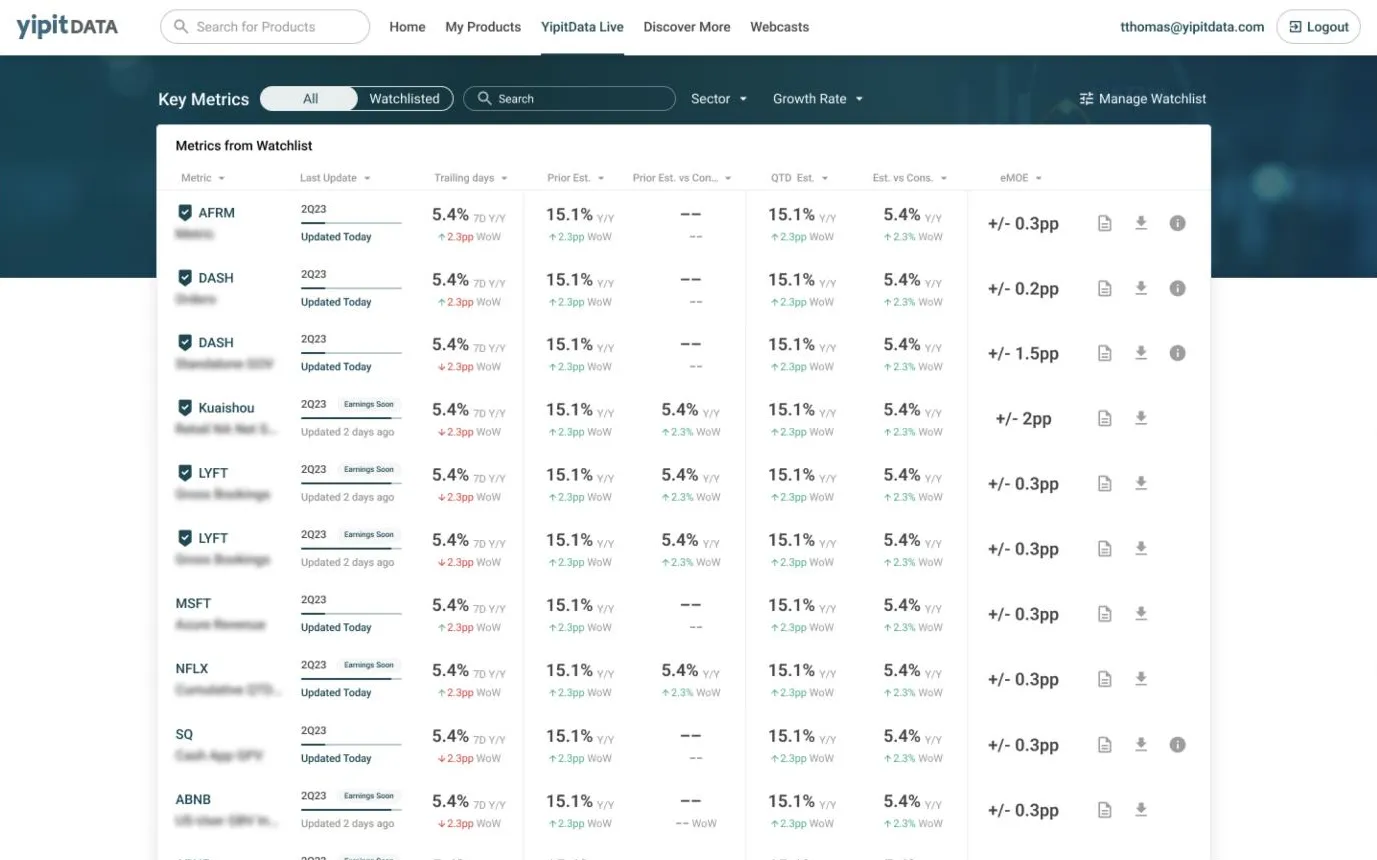
Key metrics screener
Customers were thrilled with the key metrics screener, which let them effortlessly track essential KPIs for the companies they cared about. The feature led to a 73% week-over-week retention rate.
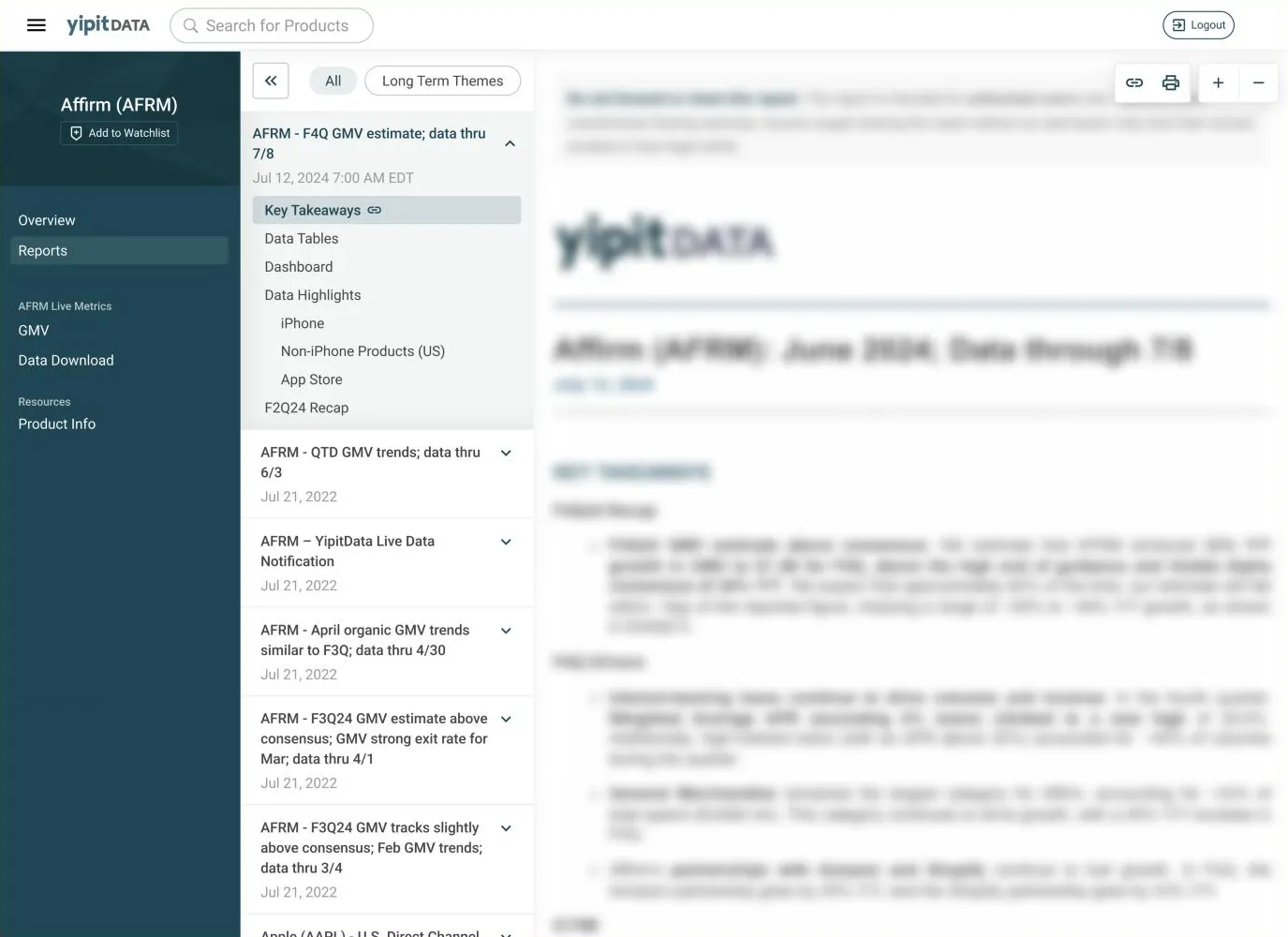
Reading a report
Previously, customers, especially new ones, struggled to find key content within a report. The new design added report outlines, adaptive zoom and links to specific sections that can be shared with peers in an organization, making reading more intuitive and collaborative.
I also worked closely with engineers on a responsive version, so the platform works well on a phone for customers on the go.
What customers said
Visiting the platform now is a force of habit. When my browser opens, Yipit opens with it.
I think I use it more actually. It’s just more inviting. It just looks better and the layout seems easily digestible. Whereas before it was a little bit archaic.